Zed Silent Disco Headphones
Your Complete Guide to Setup, Controls, and Rapid-Swap Battery Operation
Product Overview
Welcome to the Zed Silent Disco Headphones-a true game-changer in wireless audio performance. Zed introduces an industry-first Rapid-Swap removable lithium-ion battery system that eliminates event downtime, reduces e-waste, and dramatically simplifies power logistics for organizers of any scale.
Featuring an integrated Batterysense smart indicator, operators and users can monitor real-time charge levels at a glance. Combined with large 40mm Mylar dynamic drivers for deep bass, ultra-soft earpads for sound isolation, and a space-saving foldable design, Zed is engineered for non-stop festivals, fitness classes, and corporate events.
How to Set Up Your Zed Silent Disco Headphones
Setting up your Zed headphones with your Silent Disco transmitters is quick and straightforward. Follow these steps to get going in seconds:
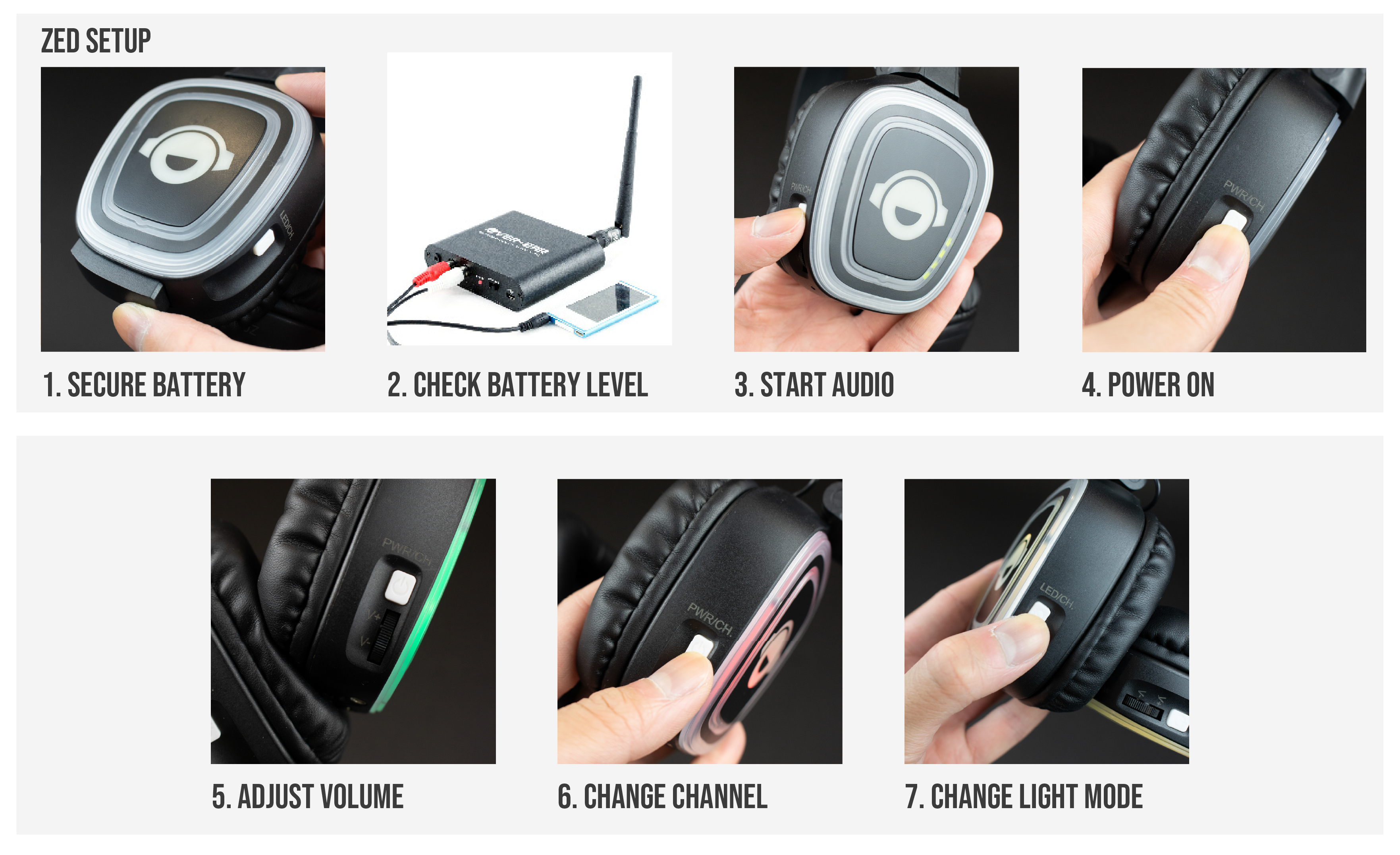
- Check Your Battery & Transmitters: Ensure your Zed battery is fully charged and securely clicked into place. Turn on your Silent Disco transmitters (such as the Falcon) and start playing music on each active channel.
- Check Battery Level: Quick-press the power button to check the Batterysense LED indicator-this lets you confirm charge levels instantly before using the headphones .
- Power On the Headphones: Press and hold the Power button for 2 seconds until the ear-cup lights illuminate to signal that the headset is active.
- Choose Your Channel: Tap the Channel Select / Scan button to toggle between Channel 1, Channel 2, and Channel 3 (depending on how many transmitters you are using). The ear-cup LED lights will switch colors accordingly so you know which feed you are listening to.
- Adjust Volume & Light Settings: Scroll the intuitive volume wheel to set your listening level. You can also press and hold the volume dial to cycle LED modes between static, flashing, or lights-off mode.
Manual: How to Use Your Headphones
Zed headphones feature channel selection buttons on both earcups to change your channel with ease during the Silent Disco.
Select a document to download (Click to Expand)
Basic Controls
- Powering On / Off: Press and hold the power button for 2 seconds. The LED lights on the earcup will light up when active. Hold again for 2 seconds to turn off.
- Channel Selection: Single-tap the Channel / Scan button to cycle between active radio frequencies. LED light colors change dynamically to match the active channel.
- Volume Wheel: Smooth analog dial located on the earcup for precise, user-controlled audio levels.
- Light Mode Control: Push and hold the volume dial to toggle the LED ear-cup lights between Static, Flashing, Fast Fade, Slow Fade, or Lights Off (ideal for film screenings or theatre).
- Auxiliary Port (3.5mm): Connect an Aux cable to share incoming audio directly with another pair of wired headphones.
Battery & Charging Management
- Rapid-Swap Removal: Unclip the 1000mAh Lithium-Ion battery module from the earcup to swap in a fresh battery instantly.
- Direct Charging: Connect a standard 5V USB-C cable directly to the headphone charging port. A full charge from 0% takes under 3 hours.
- Battery Life: Up to 11 hours with full LED lights active, or up to 12 hours with lights turned off.
Technical Specifications Summary
- Weight: 0.28 kg (280g)
- Acoustics: 40mm Mylar Speaker Drivers with HD Stereo Sound
- Frequency Response: 30 Hz – 15,000 Hz
- Signal-to-Noise Ratio: >32 dB | Impedance: 32 Ohm
- Channel Separation: >40 dB
- Broadcast Range: >300 Meters (Optimum RF Performance)
- Approved Frequencies: EU/UK/ROW: 863–865 MHz | USA/Canada: 914–917 MHz | Australia compliant