
Joe Silent Disco Headphones
Your Complete Guide to Setup, Controls, and Operation
Product Overview
Welcome to the Joe Silent Disco Headphones! Built for durability, movement, and impressive sound quality, Joe headphones deliver a well-rounded audio experience equipped with advanced 40mm drivers. Designed with an ultra-secure fit, they stay firmly in place whether you are running high-energy fitness classes, silent walking tours, or all-night parties.
Featuring a convenient foldable design for easy storage and transport, Joe headphones come equipped with glowing static LED lights that change color (Blue, Red, or Green) depending on which audio channel you are listening to. With an incredible battery life of up to 16-18 hours on a single charge, Joe is built to keep the music going all night long.
How to Set Up Your Joe Silent Disco Headphones
Setting up your Joe headphones with your Silent Disco system takes just a few seconds. Follow these steps to get started:
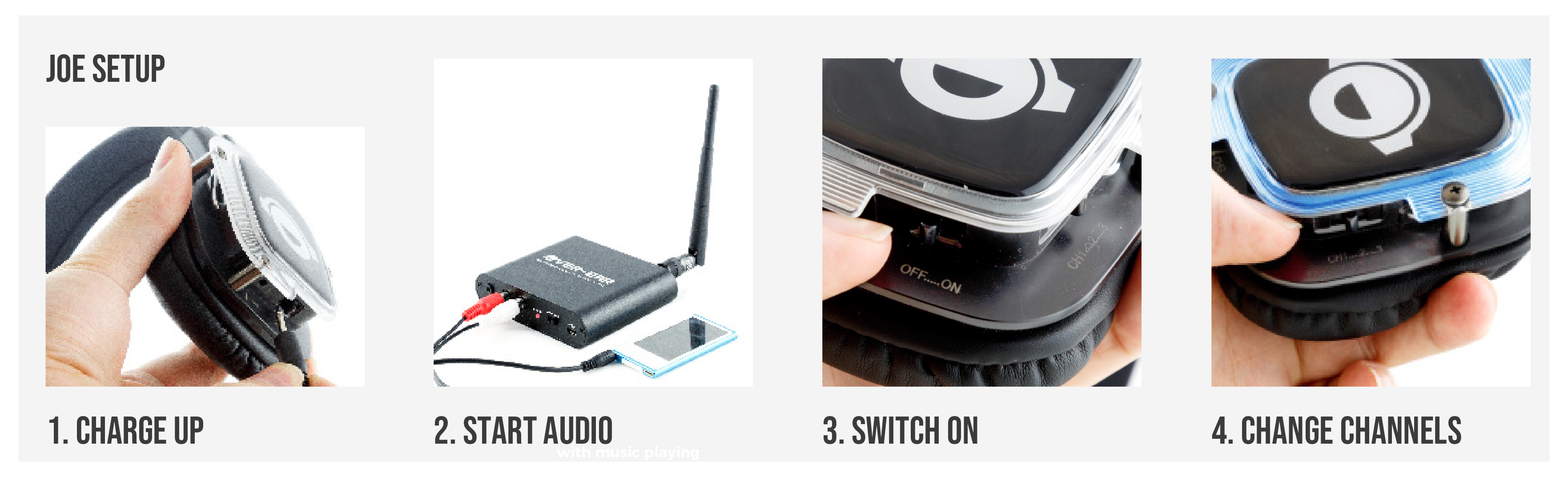
- Ensure Your Transmitters Are Active: Power on your silent disco transmitters (such as the Falcon) and connect your music source (phone, laptop, DJ mixer). Verify that each transmitter is broadcasting on a separate channel (Channel 1, 2, or 3).
- Unfold and Fit: Unfold the headphones at the headband hinges. Place them over your ears—the soft, padded ear cups and ergonomic headband grip are specially designed to stay secure during motion and fitness activities.
- Power On the Headphones: Press and hold the Power (PWR) button for 2 seconds until the LED ring illuminates on the side earcups.
- Select Your Channel: Press the Channel Select button to cycle through active audio streams. The LED ring will light up in Blue (Channel 1), Red (Channel 2), or Green (Channel 3).
- Adjust the Volume: Use the smooth analog volume wheel on the earcup to set your preferred volume level.
Manual: How to Use Your Headphones
Joe headphones feature intuitive controls located right on the earcup for seamless adjustments in low-light environments.
Select a document to download (Click to Expand)
Basic Controls
- Powering On / Off: Press and hold the main power button for 2 seconds. The static LED rings will illuminate to signal that the headset is active. Hold for 2 seconds again to power off.
- Switching Channels: Quick-tap the channel button on the earcup to switch between audio feeds.
• Channel 1: Blue LED
• Channel 2: Red LED
• Channel 3: Green LED - Volume Control: Adjust the onboard volume wheel up or down for individual listening preference.
- Audio Sharing (Aux Port): The 3.5mm jack socket on the headset can be used as an audio output to connect a second pair of standard headphones using an Aux cable!
Charging Instructions
- Insert the 5V charging cable into the charging socket on the headset.
- A full charge takes less than 3.5 hours.
- The internal 420mAh 3.7V Lithium-Ion battery provides up to 16 to 18 hours of continuous playback time with the LEDs active.
Specifications Summary
- Weight: 0.22 kg (220g)
- Speaker Drivers: Advanced 40mm Stereo
- Frequency Response: 30 Hz – 20,000 Hz
- Signal-to-Noise Ratio: > 75 dB
- Impedance: 32 Ohm
- Legal & License Free Frequencies: EU/UK/ROW: 863–865 MHz | USA/Canada: 923–925 MHz