
Bob Silent Disco Headphones
Your Complete Guide to Setup, Controls, and Operation
Product Overview
Welcome to the Bob Silent Disco Headphones! Engineered for maximum comfort, versatility, and sound clarity, Bob headphones are a staple choice for silent discos, outdoor cinema events, fitness classes, and multi-channel conferences.
Featuring an ultra-lightweight frame and fold-flat earcups, Bob is designed for effortless storage and transportation. Equipped with 40mm dynamic drivers, glowing multi-colored LED earcup lights (Blue, Red, and Green), and advanced Phase-Lock Loop (PLL) technology, Bob delivers uninterrupted, crisp audio up to 300 meters away.
How to Set Up Your Bob Silent Disco Headphones
Setting up your Bob headphones with your silent disco system takes only a few simple steps:
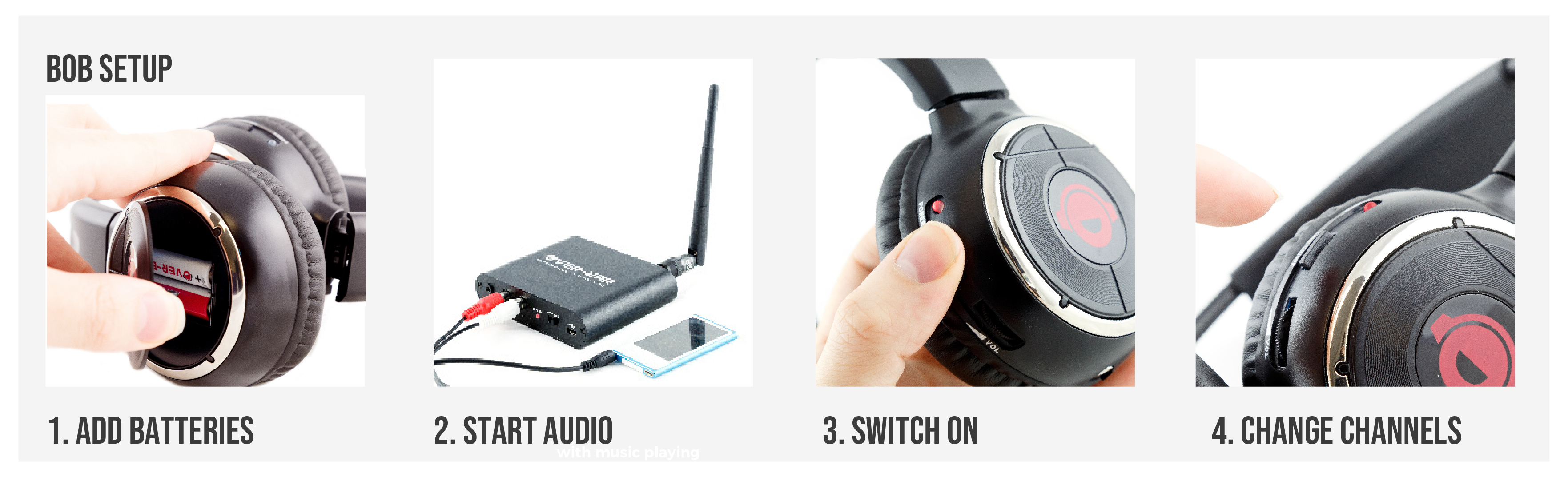
- Turn On Your Transmitters: Ensure your silent disco transmitters (such as the Falcon) are powered on, plugged into music sources, and set to different channels (Channel 1, 2, or 3).
- Unfold and Adjust: Unfold the earcups and adjust the headband for a comfortable fit over your ears.
- Power On the Headphones: Press and hold the Power button for 2 seconds until the LED lights on the side of the earcups light up.
- Select Channel:
Press the Channel / Scan button to cycle between audio streams. The LED ear-cup lights will change color to show which channel you are listening to:
• Channel 1: Blue LED
• Channel 2: Red LED
• Channel 3: Green LED - Adjust Volume: Use the smooth onboard volume wheel to set your ideal listening volume.
Manual: How to Use Your Headphones
Bob headphones feature tactile, easy-to-reach controls right on the earcup, making them simple to operate even in low-light environments.
Select a document to download (Click to Expand)
Basic Controls
- Powering On / Off: Press and hold the power button for 2 seconds. Hold for 2 seconds again to switch off.
- Channel Selection: Single-tap the Channel button to switch between frequencies. The LED light colors update instantly according to the active channel.
- Volume Wheel: Adjust the smooth analog volume control up or down to change sound levels.
- Audio Sharing (3.5mm Aux Port): Connect a standard 3.5mm audio cable to share incoming audio directly with another pair of wired headphones or external speakers.
Charging Instructions
- Connect the charging cable to the designated port on the headset.
- A full charge takes less than 3 hours.
- The internal 3.7V Lithium-Ion rechargeable battery provides 10 to 12 hours of continuous music playback.
Technical Specifications Summary
- Weight: 0.22 kg (220g)
- Acoustics: 40mm Dynamic Mylar Drivers
- Frequency Response: 30 Hz – 15,000 Hz
- Signal-to-Noise Ratio: >75 dB | Distortion: <1%
- Channel Separation: >40 dB | Impedance: 32 Ohm
- Operational Distance: Up to 300 Meters (Optimum Conditions)
- Compliant Frequencies: EU/UK/ROW: 863–865 MHz | USA/Canada: 914–917 MHz | Australia compliant